The lowest price on a mechanical keyboard often hides four separate traps: switches that risk chatter or double inputs, a socket design that limits repair, keycaps with undisclosed or thin plastic, and stabilizers that rattle under large keys. None of these traps are guaranteed by a low price alone, but each one is checkable before you buy or during your return window. The real question is not how cheap the keyboard is, but whether its switch, socket, keycap, and stabilizer construction is disclosed and testable.
Key Takeaways
- Repeated characters from a single keypress can signal chatter; test this before your return window closes.
- Hot-swappable sockets generally make switch replacement simpler than soldered boards, which need desoldering.
- ABS and PBT are separate keycap materials; verify which one is listed instead of trusting marketing language alone.
- Large keys like the spacebar and Enter rely on stabilizers, so test their rattle separately from ordinary switch noise.
- A trustworthy listing names switch type, socket construction, keycap material, and a return policy you can actually use.
The Cheapest Keyboard Traps to Reject Before Checkout
Screen any cheap mechanical keyboard listing for four warning signs, in the order they matter most. A listing that hides its switch or socket construction is the biggest risk, because you cannot judge repairability or input reliability without that information. Omitted hardware specifications mean you should treat the keyboard with caution until you can verify its behavior directly on your desk.
- Undisclosed switch or socket type: no way to plan for repairs if a switch fails.
- Repeated input after arrival: a possible chatter signal that needs troubleshooting before you decide to keep the board.
- Unspecified or visibly thin keycaps: a material question that affects feel and wear separately from the switches underneath.
- Rattle on large keys: a stabilizer issue that should be tested apart from ordinary switch sound.
Keep the return window open until the keyboard passes a basic input test and a large-key check. The sections below explain what each trap looks like and how to evaluate it.
Switch Chatter and Low-End Switches
Key chatter means a single press registers more than one character or action, which is different from a switch that simply feels scratchy or sounds loud. You can confirm the pattern quickly with an online input tester such as our keyboard test tool, which shows each keypress as it happens.
- Test the affected key repeatedly in a text field or on the test tool to confirm the repeat is consistent, not a one-time fluke.
- Clean the switch or check any debounce or firmware setting your keyboard software offers, since dust or a short debounce window can produce a similar symptom.
- Consider switch replacement if the repeat persists. Replacement is generally less involved on a hot-swappable board, so confirm your board's socket type before committing to a fix.
If the repeat follows the switch when you move it to another socket, the switch is the likely cause. If the same location keeps repeating with a different switch installed, the socket or PCB may be involved instead. Neither result is fully conclusive on its own, and a keycap and switch puller only helps if your board is hot-swappable; it will not let you remove a soldered switch.

Soldered or Outdated Sockets: The Repairability Trap
A hot-swappable socket generally lets you pull a failed switch and press in a replacement without tools beyond a puller. A soldered board requires desoldering the old switch and soldering in a new one, which takes more skill, equipment, and time. Neither construction is automatically higher quality: soldered boards are a legitimate design choice, not proof of a defect, but the choice changes what you can do if a switch fails later.
The word "mechanical" does not tell you which replacement switches will fit. Look for a listing that explicitly states hot-swap support and names the compatible pin count, usually 3-pin or 5-pin, before assuming a new switch will drop in. An old, vague, or missing socket description is a purchasing risk, because your preferred replacement switch may not physically fit even on a board advertised as hot-swappable. Never force a switch into a socket it was not confirmed to support.
Thin ABS Keycaps: A Wear and Feel Tradeoff
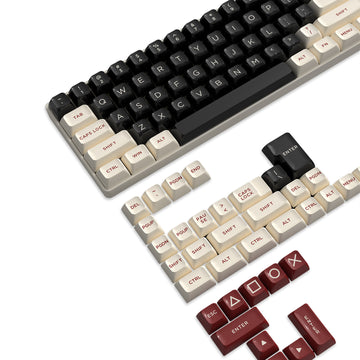
ABS and PBT are separate plastic choices for keycaps, and neither one by itself tells you anything about the switches or socket underneath. Verify the stated material in the listing, then inspect the caps on arrival for thinness, flex, or a texture that does not match the photos.
- Check the listing for the named keycap material; do not rely on photos or words like "premium" alone.
- Feel the caps on arrival for thinness, flex, or an uneven surface compared with the listing photos.
- Treat a named PBT set as one data point, not confirmation that the whole keyboard resists chatter or wear.
Our ATTACK SHARK K86 listing names double-shot PBT keycaps directly in its specifications, and our ATTACK SHARK X66 listing does the same with OEM/PBT double-shot keycaps. Both examples show what disclosed keycap material looks like on a product page, which is the standard to hold any budget listing to before you buy.

Stabilizer Rattle: Test Large Keys Separately
Stabilizers support the spacebar, Enter, Shift, and Backspace, so these keys can sound or feel different from an ordinary letter key even when the underlying switches are identical. Press each large key at its center and near an edge, then compare the sound and travel against a nearby small key.
- Spacebar: press the center and each end; listen for a hollow rattle or uneven travel.
- Enter and Backspace: press dead center and off to one side, then compare the sound to a nearby letter key.
- Shift keys: press near both ends, since long keys are more prone to tilt.
Record what you hear before making any changes to the keyboard. If the rattle sounds loose or metallic and it bothers you, returning or exchanging the keyboard is more practical than assuming a fix exists, since no single stabilizer design has been shown to eliminate this noise.
Purchasing Minimums and the Repair-or-Replace Rule
A trustworthy budget listing states five things before you buy: switch type, whether the switches are soldered or hot-swappable, the switch compatibility by pin count, the keycap material, and a return window you can actually use.
- Switch type named directly, such as linear or tactile, not just "mechanical."
- Socket construction stated explicitly as hot-swappable or soldered.
- Switch compatibility given as pin count, usually 3-pin or 5-pin, when hot-swappable.
- Keycap material named as ABS or PBT.
- A return or exchange window you can act on before it closes.
The K86 specification example names a hot-swap socket compatible with 3-pin and 5-pin switches, states a listed maximum of 10,000 hot-swap cycles, and lists double-shot PBT keycaps; that cycle figure describes the socket's stated maximum, not a guaranteed lifespan for your specific switches. The X66 specification example names a full hot-swappable PCB supporting 3-pin and 5-pin switches, linear switches, and OEM/PBT double-shot keycaps. Neither example is presented as a winner here; they simply show what fully disclosed construction looks like on a listing.
Troubleshoot a clearly hot-swappable board when the symptom is isolated to one key and pulling a switch is realistic. Choose return or replacement when chatter or rattle persists after basic checks, when construction was undisclosed at purchase, or when fixing a soldered board would take more effort than the keyboard is worth to you. Test the keyboard as soon as it arrives, write down what you observe, and keep your return option open until it passes both an input test and a large-key check.
FAQs
Is a soldered mechanical keyboard automatically a bad buy?
Soldered construction does not mean a board is low quality; it only means switch replacement requires desoldering instead of a switch puller. You can safely keep a soldered board when the socket style was disclosed up front, the key inputs register cleanly out of the box, and you accept the added effort if a switch ever fails. If inputs double-type immediately or construction was kept secret, returning the board is usually better than attempting desoldering.
How can you tell whether repeated letters come from key chatter or software settings?
Test the affected key in an input tester across multiple isolated presses. If the switch consistently registers twice during standard typing while other keys behave normally, switch chatter or internal contact bounce is the probable cause. When multiple keys repeat simultaneously across the entire board, check whether software repeat-delay settings or aggressive debounce thresholds were recently adjusted before assuming physical switch failure.
Can replacing thin keycaps fix stabilizer rattle or chatter?
No. Keycaps alter surface finger feel, legend durability, and acoustic pitch, but they do not solve electrical chatter inside the switch contacts or eliminate loose tolerance rattle in the underlying stabilizer wire. If an affordable keyboard displays severe stabilizer noise or chatter upon arrival, swap or return the unit rather than expecting an aftermarket keycap set to fix structural mechanism flaws.