A bold yellow keyboard works best as the single loudest color in the room. Ground it with dark neutrals, add exactly one neon accent color, and let keycap shape, desk mat texture, and lighting support that anchor instead of competing with it. The rest of this guide walks through each supporting choice and ends with a quick test for spotting the one element that's making the desk feel busy.
Key Takeaways
- Treat the yellow keyboard as the visual anchor; use dark neutrals to ground it and limit the setup to one additional neon accent color.
- Lower or medium sculpted keycap profiles keep a bright board visually contained, while tall SA-style sets turn it into a deliberate retro statement.
- A dark, heavy-textured desk mat is the safer pairing for a keyboard that already carries strong color; save glossy or patterned mats for a simplified setup.
- Steady amber or warm yellow lighting is the most cohesive default; treat cyan or animated modes as optional accents, not a universal preset.
- When a setup feels cluttered, mute or remove the loudest competing color, texture, or lighting effect before adding anything new.
Build a Restrained Palette Around the Yellow Keyboard
A cyberpunk look doesn't come from stacking more neon. It comes from giving each color one clear job: the keyboard attracts attention, dark surfaces let it rest, and a single accent color adds edge.
Make Yellow the Anchor
Let the keyboard be the brightest, most saturated object on the desk. Keep the case, keycaps, cables, and any nearby hardware from pulling equal attention, so your eye lands on the board first every time you sit down.
Assign the Supporting Color Roles
Once yellow has the lead role, everything else exists to support it, not match it.
- Dark neutrals ground the board. Black, charcoal, or deep gray desk surfaces and cases keep the bright yellow from washing out the rest of the setup.
- One controlled neon accent adds contrast. Cyan is a defensible secondary choice because it sits roughly opposite amber on the color wheel, giving the setup real contrast instead of two clashing warm tones.
- Amber can bridge the keyboard and the lighting. Because amber blends yellow's warmth with a touch of orange, it reads as a natural extension of the keyboard's color rather than a second competing hue, though exact shades will vary by screen and lighting source.
Choose a Keycap Profile by Silhouette
The keycap profile changes how tall and how sculpted your keyboard looks, which matters as much as color once the board is the visual centerpiece. Pick the shape that matches the mood you want, then confirm it actually fits your board.

Match Profile Shape to the Scene
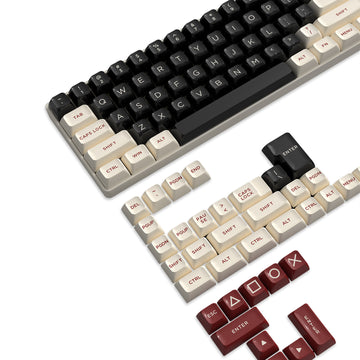
- Lower or medium sculpted profiles keep the silhouette contained and let the yellow case supply most of the visual height, a good fit when the keyboard itself is already the statement piece.
- Uniform, flatter profiles (the XDA/DSA style) give a graphic, minimal look that suits a restrained cyberpunk palette without adding extra height.
- Familiar stepped OEM-style profiles preserve the row shape most keyboards ship with, which is a low-risk choice if you want new colors without a new typing feel.
- Tall SA-style profiles make the board noticeably taller and more sculpted, turning it into a deliberate retro-futurist centerpiece rather than a background element.
Check Fit Before Color
Before buying a set for its colorway, confirm three things: the kit covers your keyboard's layout, the keycap stems match your switch type, and the profile clears any per-key LEDs or lighting bar without blocking the glow. You can browse keycap sets once you know which silhouette and fit you're shopping for.
Pair the Desk Mat Texture With the Keyboard
The desk mat is the second-largest color block on your desk, so its finish either supports the keyboard or fights it for attention. When the board is already bold, the safest move is a mat that stays visually quiet.
Use Texture as Supporting Detail
A dark, low-competition surface lets the yellow board stay the focal point instead of splitting attention with the desk itself. Heavy texture can add tactile, cyberpunk-adjacent character without introducing another bright color, but a busy printed pattern works against that goal and should be treated as its own competing visual element.
Choose the Surface Treatment
- Quiet dark fabric-style texture is the safest pairing for a bright yellow board and works in almost any setup.
- Reflective or glossy finishes are fine only when the rest of the desk, including cables and accessories, is already visually restrained.
- Patterned surfaces should stay reserved for setups where the keycaps and lighting have already been simplified, so the pattern doesn't compete with the keyboard.
Our ATTACK SHARK CM02 eSport Gaming Mousepad is one verified example of the dark, heavy-textured option: it measures 450 x 400 mm at 4 mm thick, with a heavy textured non-woven top surface, a rubber base and core, and a water- and stain-resistant coated surface. If you want a textured desk mat that stays visually out of the keyboard's way, those dimensions and surface details are the ones to check against your desk footprint.
Set Amber-Focused RGB Without Adding Clutter
Lighting should reinforce the keyboard's color, not introduce a second competing palette. Start with the calmest option and only add motion or a second color once you're sure the keyboard stays the focal point.
Build the Lighting Profile
- Start with a steady amber or warm yellow backlight as the cohesive default; it echoes the keyboard's own color instead of contrasting with it.
- Add cyan only as a restrained secondary accent, such as a single zone or underglow strip, rather than a second full-color lighting scheme.
- Reserve mixed-color animation for setups meant to feel more expressive, and only if the motion doesn't outshine the keyboard itself.
- Check your keyboard's own software or manual before naming a specific mode, since exact effects and color controls vary by model.
Separate RGB Capability From Color Control
Not every RGB keyboard gives you the same control over color. Our X87 Ultra's product record lists 22 RGB backlight effects with browser-based customization, while our X66's record confirms RGB backlighting without listing specific named modes. That gap is a useful reminder: RGB lighting alone doesn't guarantee a specific amber preset or exact color output, so check your own keyboard's documentation before planning a lighting scheme around one particular shade.
Run One Final Visual Cohesion Check
When a yellow cyberpunk setup starts to feel busy, run this check instead of adding another accessory.

- Identify the one element that's supposed to be the focal point, usually the keyboard itself.
- Look for a second color, glossy surface, or animated light that's pulling equal attention.
- Mute or turn off the competing lighting effect first, since that's the easiest change to undo.
- If the desk still feels crowded, remove or simplify the loudest remaining element, whether that's a patterned mat, a second neon color, or a busy cable setup.
- Reassess before adding anything new; a setup that passes this check is ready, one that doesn't needs another round of muting rather than more decoration.
FAQs
How can I add cyberpunk character without adding another bright color?
Cyberpunk character can come from shape and material instead of color. A taller SA-style keycap silhouette, a matte dark surface, or a subtle underglow adds futuristic edge while keeping your existing yellow-and-accent palette intact. Pick one non-color detail to change and leave the rest of the setup as quiet as it already is.
Is a glossy desk mat a bad match for a yellow keyboard?
Not automatically. Glossy or reflective mats become risky when the keyboard, keycaps, or RGB lighting are already bright, since the reflections add a second competing visual layer. Choose glossy only when the rest of your desk, including cables and accessories, stays visually restrained.
What should I do if my RGB software does not offer an amber preset?
RGB capability doesn't guarantee a specific amber preset. Check whether your exact keyboard's software lets you dial in a warm-yellow approximation manually, and reduce other active lighting effects so the closest available shade doesn't compete with mismatched colors elsewhere. If your software has no suitable warm option, leaving RGB off is a reasonable fallback rather than forcing a color it can't produce.