Choose a wireless gaming keyboard by starting with the work task you cannot compromise on, then use desk space and FPS preferences to break ties. Full-size boards suit regular number-pad work, tenkeyless boards preserve navigation and function-key access while leaving more room for the mouse, and compact 75% boards favor portability or a smaller desk footprint. Before comparing gaming extras, verify the physical key map, device connections, battery-test conditions, typing environment, and onboard behavior.

Start with the work requirement for wireless gaming keyboards
The right starting layout is the one that keeps your recurring work task friction-free. Use this scorecard to narrow the field, then treat PC-and-laptop support as a separate fit check rather than assuming a smaller board is automatically better for FPS.
| Work constraint | Starting choice | Detail to verify |
|---|---|---|
| You regularly enter data, numbers, or formulas | Full-size | Confirm a dedicated number pad, navigation cluster, function row, and the board's total width. A near-full layout can retain number-pad and navigation access while using more desk space, as shown by a near-full layout example. |
| You use navigation and function keys but want more mouse room | Tenkeyless | Confirm the arrow keys, navigation cluster, function row, and dimensions. Compare the remaining mouse clearance with your FPS setup. |
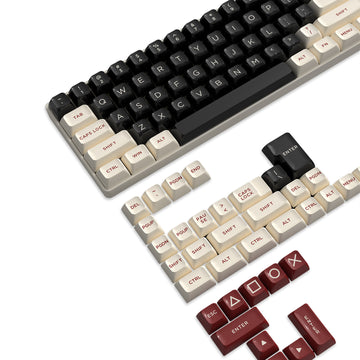
| Portability or a small desk matters more than dedicated-key access | Compact 75% | Confirm the exact key map, layers for Home and End, function-row access, ANSI US legends, and stated dimensions. Use compact 75% keyboard layouts to compare available formats, then open each model's specifications for key-map and dimension details. |
| One board must serve a desktop PC and laptop | Any layout that passes the device fit check | Verify an explicitly supported mode for each device, the switching method, receiver details, charging behavior, and the battery-test basis before adding the keyboard to the shortlist. |
If a daily work task depends on a dedicated key cluster, keep that access ahead of desk width or a gaming feature. Then use mouse clearance and portability to break a tie.

Check the exact key map behind the layout label
A label such as full-size, TKL, or 75% describes a category, not every physical key arrangement. After choosing a starting point, inspect the product image and specification sheet for the number pad, arrow keys, navigation cluster, function row, media controls, and any missing or layered keys.
On a compact board, find out how Home, End, Page Up, Page Down, and function-layer commands are reached. A shortcut that is acceptable for occasional use may become daily friction if your work depends on it. Also confirm the ANSI US layout and familiar legends if you regularly use punctuation, keyboard shortcuts, or school and office software.
Compare the stated width, depth, and height with the usable desk area, not just the surface's total dimensions. Include the space occupied by a cable, receiver, or charging connection. Measure the keyboard zone and mark the mouse area before choosing a smaller board; reduced width can improve clearance while still changing access to work keys.
Map PC-and-laptop connections to a charging routine
A multi-mode label is only a starting point. List the desktop PC and laptop, note their operating systems, and assign each device to a connection path the model offers: Bluetooth, a 2.4 GHz receiver, or wired USB. A mode name alone does not tell you how convenient switching will be.
Write down how you will switch between devices. Record whether pairing happens once or must be repeated, whether channel selection uses a dedicated button or software, where the receiver connects, whether it can be stored, and whether the board remains usable while charging. Logitech's documented channel switching between paired computers is a useful example of the detail to seek, not a universal standard: review the documented channel-switching process.
Treat battery runtime as a condition-based reference, not a calendar promise. Record the connection mode, lighting state, polling or performance setting if stated, sleep behavior, battery capacity, charging port, and indicator behavior alongside any published figure. Independent testing shows why battery runtime depends on wireless mode and lighting conditions; figures are not comparable when their test conditions differ.
Also note whether you can keep typing during charging and how the keyboard signals a low battery. One model's support documentation may describe charge-while-typing and low-battery behavior, but that behavior is model-specific. If either computer has no listed connection path or switching method, remove the keyboard from the shortlist. You can compare wireless keyboard connection options while building that device-to-mode map, then confirm each model's details separately.
Make typing feel, FPS control, and onboard settings coexist
Mixed use works best when you separate work fit, FPS fit, and configuration fit instead of treating one specification as proof of all three.
For work, consider the switch type, actuation description, keycap profile, sound information, stabilization, and the environment where you will type. An office, classroom, shared room, and home office can have different noise requirements. Use those details to decide whether the board suits your shared environment, and treat return terms as a fallback when you cannot judge the feel online. A wireless mechanical board can serve everyday computer use while still having product-specific tradeoffs in sound, stiffness, layout, or software workflow.
For FPS, check the key layout, simultaneous-input behavior, adjustable actuation or rapid-trigger options when offered, and the connection mode in which those controls work. Prioritize only features that match the games and control habits you actually use. The wireless mechanical category alone does not establish professional FPS performance. As a bounded example, a wireless mechanical keyboard can suit mixed use without proving professional FPS performance.
For onboard behavior, identify which profiles, remaps, lighting settings, or actuation settings are stored on the keyboard and which require software or a web driver on one specific computer. This matters when the board moves between a desktop and laptop. Compare polling rate, latency, and rapid-trigger precision only in the connection mode you will use for FPS, and keep those specifications separate from typing comfort and match results.
If you will type around coworkers, classmates, or family, treat stated sound information and the retailer's return terms as fit checks before prioritizing aggressive gaming controls. The best mixed-use feature is the one you can use in your actual game and work environment without creating a daily configuration problem.
Turn the requirements into a product-page pass before adding to cart
Use the scorecard and device-to-mode map as your comparison worksheet. Remove any keyboard that fails a work or device requirement before comparing optional gaming specifications.
- Record the exact layout, key access, ANSI US requirement, usable desk dimensions, and typing environment you need.
- Map each computer to its connection path and switching method, then record receiver and cable details, charging method, and the conditions behind any battery-runtime figure.
- Match the FPS controls you will actually use to the connection mode in which they work.
- Review onboard profile storage, remapping, lighting, actuation settings, and any software or web-driver dependence.
- Compare current US price, stock, shipping, returns, and warranty terms only after the keyboard passes the fit checks.
A supported store candidate can be checked against this process without becoming a ranked winner. For example, the ATTACK SHARK K86 is listed with an 86-key 75% ANSI US layout, 2.4 GHz wireless, Bluetooth 5.0, USB-C wired connectivity, hot-swappable sockets for 3- and 5-pin switches, a rechargeable 4,000mAh battery, and up to 200 hours with backlighting off. These specifications identify its layout and connection options, but they do not settle switching convenience, comfort, or FPS performance. Confirm its exact switching workflow, charging behavior, onboard storage, current price, and applicable retail terms before purchase.
For the remaining models, compare the product pages line by line against the layout choice and device-to-mode map, recording the page used for each requirement. If one required work key, connection path, charging behavior, typing-environment fit, or onboard setting remains unanswered, remove that model. This process gives you a suitable shortlist without pretending that one layout or model is best for every work-and-FPS setup.
Frequently Asked Questions
Can a wireless gaming keyboard work for office use?
Yes, when its key access, typing sound and feel, connection routine, charging behavior, and software dependence fit the office or school environment. Return terms are especially useful when sound or feel is difficult to judge online.
What should I look for in a wireless gaming keyboard?
Start with work-driven layout and key access. Next, map both devices to their connection and switching options, then compare battery conditions, typing fit, FPS controls, and onboard settings before optional lighting or customization details.
Are wireless mechanical keyboards good for FPS?
They can be suitable when the specific board's connection mode, key behavior, layout, and configuration match your setup. Wireless, mechanical, and high-polling labels do not independently prove performance, so the controls and operating mode should match the games you play before buying.